
Connecting to Poggio MCP
Connect external AI clients to the Poggio MCP server
Connect to the Poggio MCP server to access account intelligence tools directly in your AI workflow. There are three ways to authenticate, depending on your use case.
Server URL
https://mcp.poggio.io/mcpAll methods below use this same endpoint.
OAuth with Dynamic Client Registration
Best for: AI desktop clients like Claude Desktop, Cursor, Windsurf, and other MCP-aware applications that support the standard auth flow.
This is the recommended method for end-user clients. Your client handles the entire OAuth handshake automatically — no manual token management required.
Prerequisites
- Your MCP client supports the MCP server authorization design
- Your client supports Dynamic Client Registration (DCR)
Setup
- Point your client to
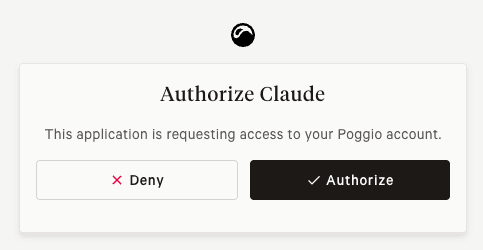
https://mcp.poggio.io/mcp. - Upon connecting, you will be redirected to the Poggio app to authorize the new client.
OAuth Client
Best for: Custom applications and backend services that need scoped access with token refresh or machine-to-machine credentials.
Create an OAuth client from Settings > OAuth Clients in your Poggio workspace. Two grant types are available:
Authorization Code with Refresh Token
Use this when your application acts on behalf of a specific user. The standard OAuth2 authorization code flow issues an access token and a refresh token, so your app can maintain long-lived sessions without re-prompting the user.
- Create an OAuth client in Settings and note the client ID and client secret.
- Redirect the user to Poggio's authorization endpoint.
- Exchange the authorization code for an access token and refresh token via the token endpoint.
- Use the access token as a Bearer token in MCP requests. Refresh it when it expires.
Client Credentials
Use this for server-to-server integrations where no user interaction is involved. The client authenticates directly with its own credentials.
- Create an OAuth client in Settings with the client credentials grant type.
- Request an access token directly from the token endpoint using your client ID and secret.
- Use the access token as a Bearer token in MCP requests.
Bearer Token
Best for: Quick prototyping, simple scripts, and integrations where OAuth is unnecessary overhead.
Generate an API token from Settings > MCP Server in your Poggio workspace.
- Click "Generate token" and provide a descriptive name.
- Copy the token immediately — it is only displayed once.
- Pass the token as a Bearer token in your client's request headers.
from mcp import ClientSession
from mcp.client.streamable_http import streamablehttp_client

url = "https://mcp.poggio.io/mcp"
headers = {"Authorization": "Bearer YOUR_API_TOKEN_HERE"}

async with streamablehttp_client(url=url, headers=headers) as (r, w, _):
    async with ClientSession(read_stream=r, write_stream=w) as session:
        await session.initialize()
        tools = await session.list_tools()
        print([t.name for t in tools.tools])
The connection URL does not include a workspace identifier — workspace scoping is enforced via the token.
Testing the Connection
The MCP Inspector provides a friendly UI for connecting to remote MCP servers, exploring capabilities, and invoking tools directly. To launch it locally (requires Node v22+):
npx @modelcontextprotocol/inspector \
  --transport=http \
  --server-url=https://mcp.poggio.io/mcp
Paste your Bearer token or OAuth access token into the token input, then click Connect.
Security Best Practices
- Generate separate credentials for each client or use case
- Use descriptive names to track their purpose
- Rotate tokens regularly and revoke any that are no longer needed
- Monitor access patterns for unusual activity
- Ensure client applications meet your organization's security standards
Troubleshooting
Connection failures
- Verify the server URL is correct and accessible
- Check that credentials are valid and not expired
- Confirm network connectivity and firewall settings
- Ensure MCP Server is enabled for your workspace
Authentication errors
- Verify tokens are copied correctly without extra whitespace
- Check that the token or OAuth client has not been revoked
- For OAuth clients, confirm the grant type matches your flow
Performance issues
- Monitor response codes, especially
429 Too Many Requests - Consider caching strategies in client applications
- Contact Poggio support to request higher API request quotas
For additional assistance, contact support@poggio.io or your account manager.